Important facts
- Healthy ergonomics is about more than comfort, it is a legal requirement in managing workplace risks.
- Early identification of ergonomic hazards help prevent musculoskeletal disorders, reduce absenteeism and promote a healthier, more productive workforce.
- Implementing ergonomic principles protects employee health, improves productivity and assists employers in complying with the Occupational Health and Safety Act.

Legal requirements
Physical Agents Regulations, 2024 require that employers identify, assess and control ergonomic risk factors that may contribute to musculoskeletal disorders (MSDs), visual fatigue, physical discomfort and reduced work performance.
Legislative Acts and regulations to be aligned with
- Occupational Health and Safety Act, 1993 (Act 85 of 1993) – Section 8: General Duties of Employers
- Physical Agents Regulations, 2024 – Ergonomics, including the identification, assessment and control of ergonomic hazards
- Physical Agents Regulations, 2024 – Illumination requirements for preventing visual fatigue
- Physical Agents Regulations, 2024 – Indoor Air Quality provisions supporting healthy indoor work environments
Common ergonomic hazards
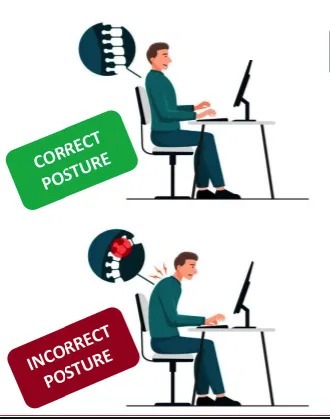
- Incorrect monitor height and/or viewing distance
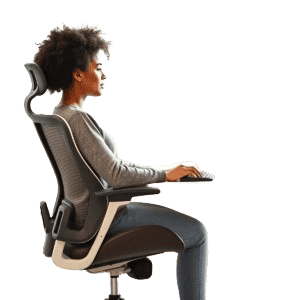
- Poor chair adjustment and inadequate lumbar support
- Poor workstation design that promotes awkward posture
- Repetitive movement and use of keyboard and mouse
- Inadequate lighting and/or excessive screen glare
- Long periods of uninterrupted sitting
- Unhealthy indoor environmental conditions
- Incorrect positioning of equipment, forcing reaching or twisting to access work tools
- Insufficient recovery breaks
What to look out for
- Neck, shoulder or back pain
- Wrist or hand discomfort
- Tingling or numbness in fingers
- Frequent headaches
- Eye strain or blurred vision
- Employees leaning forward towards monitors
- Slouched sitting posture and tucked legs
- Reduced concentration and productivity
- Increased fatigue as workday progresses
- Repeated reports of discomfort while working on computer
What can you do?
Basic tips to help protect your eyesight and posture, and reduce stress and fatigue
- Position the monitor directly in front of you, approximately 50–70 cm from your eyes (or arm’s length away)
- Position the top of the screen at or just below eye level
- Reduce glare by adjusting lighting and monitor placement.
- Increase text size where necessary.
- Keep keyboard and mouse close to the body
- Follow the 20-6-20 rule: take a break from your screen every 20 minutes, concentrate on something approximately 6 metres away, maintain focus for at least 20 seconds
- Sit with your back fully supported
- Keep feet flat on the floor or on footrest, and knees and hips at approximately 90 degrees
- Keep shoulders relaxed, elbows close to the body and wrists straight while typing
- Position frequently used equipment within easy reach
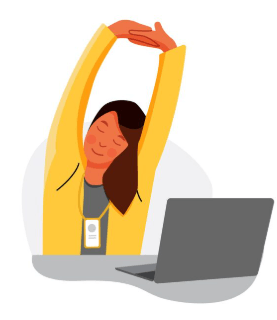
- Move regularly, stretching neck, shoulders, back and wrists at least every 30-60 minutes
- Alternate between sitting and standing where possible
- Report discomfort before it develops into an injury
Employer responsibilities
- Conduct ergonomic risk assessments
- Identify employees exposed to ergonomic hazards
- Implement engineering and administrative controls
- Ensure workstations are suitable for the individual employee
- Provide ergonomic awareness and training
- Review workstation design whenever work processes change
- Investigate reports of discomfort or musculoskeletal symptoms
- Maintain adequate lighting and indoor environmental quality
Related

South Africa's retail landscape is in the midst of a structural reset. Macroeconomic pressures, rapid technological advancements and radical changes in consumer behaviour. Traditional physical, in-store retail categories, long driven [...]

THE BACKBONE OF SMARTER ASSET MANAGEMENT Condition assessments are one of the cornerstones of asset management. The knowledge of the actual condition of assets is important to operate in [...]